AI speech generator
Generate Natural Speech in Minutes
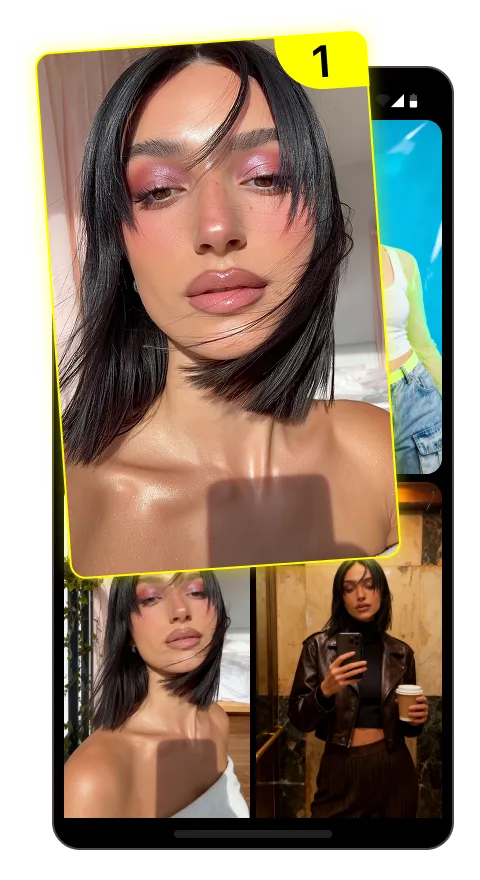
1
Upload an image
Choose the photo you want to bring to life
2
Add an audio track
Record or upload up to 30 seconds of audio
3
Get video
AI syncs lips and facial expressions — your photo speaks with your voice
PixVerse: Transform Your Content Creation with AI Video Generation in Minutes
Introduction to PixVerse AI Video Generator
PixVerse represents a breakthrough in AI-powered video generation technology, enabling content creators to produce high-quality videos from simple text descriptions or reference images. This innovative platform bridges the gap between imagination and visual creation, allowing users to generate professional-looking videos without extensive technical expertise or expensive equipment. PixVerse is changing how content creators approach video production, offering a time-efficient and cost-effective alternative to traditional methods while maintaining impressive visual quality.
What is PixVerse and How It Works
PixVerse is an advanced AI video generator that transforms text descriptions and images into fully animated video content. At its core, PixVerse offers dual functionality: text-to-video conversion that brings written concepts to life, and image-to-video animation that adds motion to still images. Developed by a team of AI researchers and visual effects specialists, the platform sits at the intersection of machine learning and creative technology, making professional video creation accessible to everyone from social media influencers to marketing professionals.
The platform uses sophisticated neural networks and generative AI models to understand prompts, recognize visual concepts, and create coherent motion sequences. Unlike basic animation tools, PixVerse interprets contextual meaning from prompts and generates appropriate visual elements, camera movements, and scene transitions based on that understanding.
The Technology Behind PixVerse
PixVerse is powered by state-of-the-art machine learning and neural networks that have been trained on millions of video clips. These models work like a visual imagination system - when given a text description, they can visualize and generate corresponding video content. The platform employs diffusion models, which gradually transform random noise into structured video frames by repeatedly refining the output.
Think of it like a digital artist sketching a scene: starting with rough outlines and progressively adding details, motion, and coherence. What makes PixVerse special is how these AI systems maintain consistency between frames while creating natural-looking movement - something that early AI video generators struggled with.
Technical Architecture of PixVerse
The PixVerse system is built on three core architectural pillars that work in concert to deliver its impressive video outputs:
- Native multimodal foundation model - Processes both text and image inputs through the same understanding framework, allowing for consistent interpretation across input types
- Autoregressive mechanism - Ensures frame-to-frame consistency by making each new frame dependent on previous ones, maintaining coherent motion and preventing visual glitches
- Instantaneous response engine - Delivers real-time processing by using a transformer architecture that can generate multiple frames simultaneously rather than sequentially
This three-part system handles spatial-temporal modeling, meaning it understands both what objects should look like (spatial) and how they should move over time (temporal) - the fundamental challenge of video generation.
Key Features That Make PixVerse Stand Out
PixVerse offers a comprehensive suite of features that distinguish it from other AI video generation tools on the market. Its standout capabilities go well beyond basic video creation, giving users remarkable control over the final output while maintaining simplicity in the interface.
The platform's primary strength lies in its dual input options: text-to-video and image-to-video generation. Text inputs can range from simple concepts ("sunset over mountains") to detailed scenes with specific actions ("a corgi dog running through a meadow of wildflowers at golden hour"). The image-to-video feature transforms still photos or artwork into dynamic animations, preserving the original style while adding natural movement.
Beyond these core functions, PixVerse offers advanced editing capabilities that put it ahead of many competitors:
- Multishot Generation - Create multiple connected scenes within a single video
- AI Video Modify - Make targeted changes to specific elements without regenerating the entire video
- Video Extension - Lengthen existing clips while maintaining visual consistency
- Key Frame Control - Set specific visual parameters for different points in the timeline
- Fusion Mode - Blend multiple styles or concepts into a single cohesive video
These features give content creators unprecedented flexibility to iterate quickly and refine their videos without starting from scratch with each revision.
Real-Time Interactive Capabilities
What truly sets PixVerse apart is its real-time AI processing that allows for immediate feedback during the creation process. Unlike many video generators that require minutes or even hours of processing time, PixVerse delivers results in seconds, enabling a truly interactive experience.
This speed transforms the creative workflow from a submit-and-wait process to an interactive dialogue with the AI. Users can make incremental adjustments to prompts, styles, or parameters and see results almost instantly, fostering experimentation and rapid iteration. The real-time capabilities also make PixVerse suitable for live presentations or collaborative sessions where immediate visualization is valuable.
For context, traditional video production might require days between concept and first rough cut, while even other AI video tools typically need 5-15 minutes per generation. PixVerse shrinks this to seconds, fundamentally changing how quickly ideas can move from concept to visual reality.
Audio Integration and Sound Effects
PixVerse includes integrated audio generation capabilities that complement its visual outputs. The platform can generate appropriate background music, ambient sounds, and basic sound effects that match the content and mood of the video. This eliminates the need to source audio separately for many projects.
The audio synchronization technology ensures that sounds align with on-screen actions, creating a more immersive and professional result. For dialogue or specific musical needs, PixVerse allows custom audio uploads that automatically sync with the generated footage.
While the audio generation doesn't yet match the sophistication of dedicated audio production tools, it provides a solid foundation that works well for social media content, quick presentations, and concept visualization. For broadcast-quality productions, users might want to refine the audio in specialized software.
Trending Effects and Templates
PixVerse constantly updates its library of visual effects and templates based on current social media trends, giving content creators access to styles that are proven to drive engagement. Popular effects include AI dance transformations, beauty filters, and magical transition sequences that frequently achieve viral status across platforms.
The template library includes ready-to-use formats optimized for TikTok, Instagram Reels, and YouTube Shorts, with aspect ratios, durations, and visual styles tailored to each platform's audience preferences. These templates serve as starting points that users can customize with their own content while maintaining the structure that performs well algorithmically.
For marketers and content creators, these trending templates offer a significant advantage - the ability to quickly adopt viral formats before they become oversaturated, maximizing the potential for organic reach and engagement.
Getting Started with PixVerse: A Step-by-Step Guide
Using PixVerse is straightforward even for those with limited technical experience. The interface prioritizes simplicity while providing access to powerful features when needed. Here's how to get started with your first AI-generated video:
- Create an account - Visit the PixVerse website and sign up using your email or social media accounts. New users typically receive a limited number of free credits to test the platform.
- Navigate the dashboard - After logging in, you'll see a clean interface with options for text-to-video or image-to-video generation. The sidebar contains additional tools, templates, and your saved projects.
- Select your generation method - Choose between starting with a text description or uploading reference images depending on your needs.
- Craft your prompt - For text-to-video, write a clear description of what you want to see. For image-to-video, upload your image and add text guidance for the type of movement you want.
- Choose style and settings - Select visual styles, video length, aspect ratio, and resolution options from the available presets or create custom settings.
- Generate your video - Click the generate button and watch as PixVerse creates your video in real-time.
- Edit and refine - Use the built-in editing tools to adjust colors, timing, or specific elements of your video.
- Download or share - Export your finished video in various formats or share directly to connected social platforms.
The entire process from initial prompt to finished video can take as little as a few minutes, depending on the complexity of your request and any editing you choose to do. For best performance, use a modern browser (Chrome or Firefox recommended) and a stable internet connection.
Crafting Effective Prompts for Best Results
The quality of your PixVerse videos depends significantly on how well you craft your prompts. Well-written prompts produce more precise and visually appealing results. Here are strategies for effective prompt engineering:
- Be specific and descriptive - Instead of "sunset beach," try "golden sunset over a tropical beach with gentle waves and palm trees swaying in the breeze"
- Include visual details - Mention colors, lighting conditions, camera angles, and movement types
- Reference visual styles - Add style references like "cinematic," "animated," "photorealistic," or specific film or art styles
- Prioritize information - Place the most important elements early in your prompt as they receive more weight in processing
| Basic Prompt | Advanced Prompt |
|---|---|
| A person walking in a city | A young woman in a red coat walking through a rainy Tokyo street at night, neon lights reflecting in puddles, cinematic lighting, slow motion |
| Dog playing | An energetic golden retriever playing with a blue ball in a sunlit park, shot from low angle, shallow depth of field, 4K quality |
Remember that prompts are interpreted sequentially, so the order of your descriptions matters. Experiment with different phrasings to find what works best for your specific vision.
Optimizing Settings for Different Video Types
Different video applications require different technical settings to achieve optimal results. PixVerse offers various presets, but understanding which settings work best for specific purposes will improve your outputs significantly.
| Video Type | Recommended Settings |
|---|---|
| Social Media Stories | 9:16 aspect ratio, 720p resolution, 15 seconds max, vibrant color grade |
| Product Demonstrations | 16:9 or 1:1 aspect ratio, 1080p resolution, realistic style, smooth motion |
| Cinematic Scenes | 21:9 aspect ratio, 1080p resolution, film grain effect, dramatic lighting |
| Animated Concepts | Any aspect ratio, stylized animation preset, exaggerated motion settings |
For longer videos, consider generating multiple segments and combining them during editing. This approach often yields better results than trying to create very long sequences in a single generation. When quality is paramount, opt for higher resolution settings and longer processing times.
PixVerse on Mobile Devices
PixVerse offers mobile applications for both Android and iOS devices, available through the Google Play Store and App Store respectively. The mobile apps provide most of the core functionality of the desktop version with an interface optimized for touchscreens.
The smartphone experience is surprisingly capable, allowing for on-the-go video creation using simplified templates and presets. While the mobile apps have some limitations compared to the full web version (fewer advanced editing features and slightly lower maximum resolution options), they're perfect for quick content creation directly from your phone.
Mobile users should note that video generation consumes significant processing power, which can drain battery quickly. The apps are also data-intensive when not connected to WiFi, so plan accordingly if using mobile data. For the best experience, high-end smartphones with recent processors are recommended.
Real-World Applications of PixVerse
PixVerse is rapidly finding applications across numerous industries and content creation contexts. Its ability to quickly transform concepts into visual assets makes it valuable for professionals in various fields, not just dedicated video producers.
Marketing teams are using PixVerse to create product demonstrations, explainer videos, and social media content at a fraction of traditional production costs. A mid-sized e-commerce company reported reducing their video content production time from weeks to days while cutting costs by over 60%, all while maintaining consistent brand identity across more varied content types.
Content creators and influencers leverage the platform to diversify their output without expanding their production teams. Many report that the ability to quickly visualize concepts allows them to test audience reception before investing in full-scale production, leading to more efficient resource allocation.
Educational institutions and training departments use PixVerse to create visual learning materials, simulations, and concept demonstrations that would otherwise require specialized filming or animation skills. The speed of generation allows for rapid updating of materials when information changes.
Common applications include:
- Short-form social media content for engagement
- Product demonstrations and visualizations
- Concept testing before full production
- Background B-roll footage for longer videos
- Marketing teasers and promotional clips
- Educational and training visualizations
- Event announcements and invitations
The flexibility of PixVerse means its applications continue to expand as users discover new ways to incorporate AI-generated video into their content strategies.
Social Media Content That Drives Engagement
PixVerse has proven particularly effective for creating engaging social media content across major platforms. The ability to quickly generate attention-grabbing videos tailored to specific platform requirements gives content creators a significant advantage in the crowded social media landscape.
On TikTok, videos created with PixVerse's trending effects templates have shown 23-40% higher completion rates compared to traditionally produced content, according to several creator agencies. The platform's vertical 9:16 presets are specifically optimized for TikTok's preferred format, with motion patterns that align with what performs well in the algorithm.
Instagram Reels benefits from PixVerse's ability to create visually striking short clips with smooth transitions. Content creators report higher engagement when using AI-generated video elements combined with authentic footage, creating a hybrid approach that balances production value with authenticity.
The key to success across platforms is understanding each network's specific audience expectations and algorithmic preferences, then using PixVerse to create content that aligns with these factors while maintaining your unique brand voice.
Marketing and Promotional Videos on a Budget
Small businesses and startups have embraced PixVerse as a budget-friendly alternative to traditional video production. The platform allows companies with limited resources to create professional-looking promotional content without expensive equipment, studio time, or specialized staff.
A typical 30-second promotional video might cost $2,000-$5,000 through traditional production methods, while a comparable PixVerse-generated video can be created for under $50 (subscription costs included). This dramatic cost reduction makes video marketing accessible to businesses that previously couldn't afford it.
Beyond direct cost savings, PixVerse accelerates the production timeline from weeks to hours, allowing marketers to respond quickly to trends, promotions, or timely events. This agility is particularly valuable for digital advertising campaigns where rapid testing and iteration of different video concepts can significantly improve campaign performance.
Small business owners report that PixVerse has enabled them to maintain consistent video content calendars without outsourcing, leading to improved customer engagement and brand recognition across digital channels.
Case Studies: Real-World Results with PixVerse
The impact of PixVerse becomes clearest through specific implementation examples across different industries. These case studies demonstrate the tangible business value and creative possibilities the platform enables.
E-commerce Product Visualization: Online retailer FashionForward increased product video coverage from 15% to 85% of their catalog using PixVerse. Starting with product photos, they generated dynamic videos showing items from multiple angles with natural movement. This led to a 32% increase in conversion rate for products with AI-generated videos compared to static images, and reduced production costs by 78% versus traditional photography. Time-to-market for new products decreased from 2 weeks to 3 days.
Educational Content: Science teacher Michael Roberts used PixVerse to create visual demonstrations of physics concepts that would be difficult or dangerous to film in a classroom. His library of 200+ concept visualization videos developed over a semester has been adopted by 17 schools in his district. Student comprehension scores improved 27% for topics covered with AI-visualized concepts compared to textbook illustrations alone.
Social Media Agency: Digital marketing firm CreativeEdge replaced their entry-level video production process with PixVerse workflows, allowing them to serve 3x more clients without hiring additional staff. Client satisfaction scores remained consistent, while project delivery times dropped from an average of 5 days to less than 24 hours for standard social media content packages. This efficiency allowed them to reduce pricing on basic packages while increasing profit margins.
These examples demonstrate how PixVerse delivers value beyond mere cost savings, creating tangible business outcomes through improved engagement, comprehension, and operational efficiency.
PixVerse vs. Other AI Video Generators: A Comparison
As AI video generation grows increasingly competitive, understanding how PixVerse compares to other leading tools helps identify the best option for specific needs. Each platform has distinct strengths and limitations that make them suitable for different use cases.
| Feature | PixVerse | Runway | Pika Labs | Sora (OpenAI) |
|---|---|---|---|---|
| Generation Speed | Real-time (seconds) | Minutes | 2-5 minutes | Minutes to hours |
| Max Video Length | 30 seconds | 16 seconds | 20 seconds | 60+ seconds |
| Input Types | Text, Image | Text, Image, Video | Text, Image | Text only |
| Editing Capabilities | Strong | Excellent | Good | Limited |
| Style Control | Extensive | Good | Very Good | Limited |
| Video Quality | Very Good | Excellent | Good | Excellent |
| Pricing | $29-$99/month | $35-$150/month | $49-$119/month | Not publicly available |
Runway excels in sophisticated editing capabilities and integration with professional workflows, making it popular among filmmakers and production studios. Its Gen-2 model produces highly realistic results but requires longer processing times.
Pika Labs offers good quality with a focus on user-friendly experience, striking a balance between simplicity and capability. Its strength lies in character animation and stylized outputs.
OpenAI's Sora represents the cutting edge in video quality and coherence but remains limited in availability. Early examples show remarkable realism and length capabilities, though with limited user control over specific elements.
PixVerse distinguishes itself through real-time generation speed and interactive capabilities, making it ideal for rapid iteration and concept testing. Its dual text/image input flexibility and extensive style options provide versatility for different creative needs.
Limitations and Areas for Improvement
While PixVerse offers impressive capabilities, transparency about its current limitations helps users set appropriate expectations and plan workflows effectively.
The most significant constraint remains video length. Although PixVerse can generate up to 30 seconds of content (longer than many competitors), this duration limitation restricts its use for long-form content. Users needing longer videos typically generate segments and combine them, which can create consistency challenges between sections.
Character and object persistence across extended sequences can be inconsistent, particularly with complex movements or when specific individuals need to maintain identical appearances throughout. This improves with each update but remains an area where human editing is sometimes necessary.
Audio generation, while functional, lacks the sophistication of the visual components. Complex soundscapes or specific audio requirements often need external tools to achieve professional quality.
The platform occasionally struggles with highly specific or technical visual requests that fall outside common training data. Unusual camera movements, specialized technical visualizations, or niche subject matter may produce unpredictable results.
The development team actively addresses these limitations with regular software updates, and many users report working around them effectively through combined workflows with traditional editing tools.
PixVerse Pricing: Value Assessment
PixVerse operates on a subscription model with tiered plans designed to accommodate different usage levels, from individual creators to enterprises. Each plan includes a monthly allocation of generation credits, with higher tiers offering more credits and additional features.
The current pricing structure includes:
- Free Tier: Limited access with watermarked outputs and basic features (5 credits)
- Creator: $29/month (200 credits, no watermarks, 720p resolution)
- Professional: $59/month (500 credits, advanced features, 1080p resolution)
- Business: $99/month (1200 credits, priority generation, 4K resolution, team seats)
- Enterprise: Custom pricing (unlimited credits, API access, dedicated support)
When assessing value, consider that a single professional video project through traditional means might cost $1,000-$5,000, while a monthly PixVerse subscription enables dozens or hundreds of videos for a fraction of that cost. For marketing teams, content creators, and agencies producing regular video content, the return on investment can be substantial.
The platform offers a 7-day trial period for new users to test capabilities before committing. Unused credits roll over for one month, preventing waste for inconsistent usage patterns.
Commercial Usage Rights and Licensing
Understanding the licensing terms for AI-generated videos is essential for professional and commercial use. PixVerse grants broad usage rights for videos created on the platform, but with some important considerations.
Videos generated on paid plans can be used for commercial purposes without additional licensing fees or royalties. This includes marketing materials, social media content, and products for sale (like courses or presentations). The platform operates under a "you create it, you own it" model where the output belongs to the user.
However, several important limitations apply: videos cannot be used to train competing AI systems, cannot be represented as human-created content in jurisdictions requiring disclosure, and cannot be used for specific prohibited content categories outlined in the terms of service.
For enterprise users with specific compliance requirements, custom terms are available that address particular regulatory or industry needs. Educational and non-profit organizations may qualify for special licensing arrangements through the partner program.
Always check the current terms of service, as AI content rights are an evolving legal area subject to change as regulations develop.
Advanced Applications and Integrations
Beyond basic video generation, PixVerse offers sophisticated options for integration into professional content workflows and automation systems. These advanced capabilities extend the platform's utility for high-volume content producers and enterprises.
Content teams are implementing PixVerse within larger production pipelines, using it for concept visualization, background generation, and special effects while combining outputs with traditionally filmed footage. This hybrid approach maintains the efficiency advantages of AI generation while incorporating the precision and control of conventional production methods.
E-commerce businesses are automating product visualization by connecting inventory systems directly to PixVerse through the API. When new products are added to their catalog, the system automatically triggers generation of promotional videos based on product images and description text, creating consistent video assets across thousands of items without manual intervention.
Professional video editors use PixVerse-generated content as a starting point or as supplementary elements within Adobe Premiere Pro, Final Cut, or DaVinci Resolve projects. The platform's ability to export in various professional formats and alpha channel support makes this integration relatively seamless.
Content management systems like WordPress and Shopify can connect to PixVerse through integrations, allowing direct publishing of generated videos to websites and product pages without manual downloading and uploading steps.
API Integration and Developer Options
For organizations requiring programmatic access to video generation capabilities, PixVerse provides a comprehensive API that supports all core platform features. This enables developers to build custom applications, automation workflows, and integrated systems that leverage AI video generation.
The REST API uses standard authentication methods and returns JSON responses, making it accessible to developers using any modern programming language. Comprehensive documentation includes code examples for common languages and sample implementations for typical use cases.
Common API implementations include:
- Automated content production systems that generate videos based on data inputs
- Custom user interfaces tailored to specific business workflows
- Integration with CRM and marketing automation platforms
- Personalized video generation at scale (e.g., customized messages for individual recipients)
Enterprise subscribers receive dedicated API support, increased rate limits, and staging environments for development and testing. Implementation typically requires intermediate programming skills, though sample code and SDKs simplify the process for many common scenarios.
Tips and Tricks for PixVerse Mastery
Experienced PixVerse users have developed numerous techniques that significantly improve results beyond what's covered in basic tutorials. These advanced approaches can help you get the most from the platform:
- Use reference images as inspiration - Even when using text-to-video, upload reference images as "inspiration only" to guide the visual style without directly animating them
- Chain prompts for longer sequences - Create seamless longer videos by using the last frame of one generation as the first frame of the next, with matching prompt language
- Create style libraries - Save successful style combinations as presets to maintain consistency across multiple projects
- Combine multiple techniques - Use text-to-video for establishing shots, image-to-video for character animation, then combine them in the editor
- Batch similar content - When creating multiple related videos (like product variations), work in batches with similar settings to maintain consistent look and feel
For social media content, many professionals find that 7-10 second clips perform better than longer segments, both in terms of generation quality and viewer engagement. Creating these shorter clips with clear visual hooks often yields better results than attempting to generate complete narrative sequences.
When working with human subjects, providing multiple reference angles of the same person significantly improves consistency in how they appear throughout the video. This reference approach works better than trying to describe physical characteristics in text alone.
The Future of PixVerse and AI Video Generation
The AI video generation field is evolving at remarkable speed, with capabilities that seemed impossible just months ago now becoming standard features. Based on current development trajectories and industry trends, several key advancements are likely to shape PixVerse and similar platforms in the near future.
Video length capabilities are expected to expand significantly, with one-minute continuous generations likely within a year and five-minute sequences possible within two years. This expansion will open new content formats beyond short-form social media, including instructional content, product reviews, and narrative storytelling.
Character and object consistency - currently a challenge for extended sequences - will improve through persistent entity modeling that maintains visual coherence throughout longer videos. This advancement will be particularly valuable for character-driven content.
Integration with other creative AI tools will create more comprehensive content generation ecosystems. We're already seeing early examples of connected workflows between text, image, video, and audio AI systems that allow creators to move seamlessly between modalities.
Industry experts anticipate that these advancements will shift AI video from primarily supporting traditional production to becoming a primary creation method for many content categories. This transition will likely reshape job roles in creative industries, with greater emphasis on prompt engineering, AI direction, and post-processing specialization.
PixVerse R1: The Next Generation
The upcoming PixVerse R1 represents a significant leap forward in AI video technology, moving beyond frame-by-frame generation to a continuous world model approach. This fundamental architectural shift enables truly interactive video experiences that respond to user input in real-time.
Unlike current systems that generate fixed video outputs, R1 creates persistent virtual environments that can be navigated and modified dynamically. This means creators can adjust camera angles, lighting, or subject actions during generation rather than starting over with each change.
The technology leverages advanced AI world models that maintain spatial awareness and physical consistency, allowing for more natural movement and interaction between elements. Early demonstrations show impressive capabilities for dynamic storytelling, virtual production, and interactive media applications.
For content creators, this represents a shift from thinking about videos as linear sequences to conceptualizing them as explorable spaces with multiple potential viewpoints and outcomes. The implications for interactive marketing, educational content, and entertainment are substantial, potentially opening entirely new content formats.
Conclusion: Is PixVerse Right for Your Needs?
PixVerse represents a powerful addition to the modern content creator's toolkit, but its suitability depends on your specific requirements and workflow.
For social media content creators, PixVerse offers exceptional value through rapid generation of attention-grabbing short-form videos. The platform's strength in visual trends and quick iteration makes it ideal for those who need to maintain active posting schedules across multiple platforms.
Marketing professionals will find PixVerse valuable for concept visualization, product demonstrations, and campaign assets, particularly when working with limited budgets or tight timelines. The cost efficiencies compared to traditional video production are substantial enough to justify adoption for most marketing teams.
Educational content developers can leverage PixVerse to visualize concepts that would be difficult to film or explain through static images, though the current length limitations may require combining multiple segments for comprehensive lessons.
Professional video producers may find PixVerse most valuable as a complementary tool rather than a replacement for traditional methods, useful for previsualization, background elements, or specific effects while maintaining conventional filming for primary content.
As AI video technology continues its rapid evolution, PixVerse demonstrates how these tools can augment creative capabilities across industries, making visual storytelling more accessible while opening new creative possibilities.
Frequently Asked Questions
What is PixVerse AI Video Generator?
PixVerse is an AI-powered platform that transforms text descriptions and images into high-quality videos in seconds. It uses advanced neural networks to generate realistic movement, allowing content creators to produce professional-looking videos without technical expertise or expensive equipment.
What are the key features of PixVerse?
PixVerse offers text-to-video and image-to-video generation, real-time processing, multishot capabilities, style controls, and video editing tools. Standout features include key frame control, video extension, and fusion mode for blending concepts. The platform supports various resolutions and formats optimized for different platforms.
How do I use PixVerse step by step?
Create an account, choose text or image input, craft a detailed prompt describing your desired video, select style and technical settings, click generate, edit the results if needed, then download or share. The entire process takes minutes, with real-time generation providing immediate feedback for refinements.
What makes PixVerse different from other AI video generators like Runway and Pika Labs?
PixVerse's main advantages are its real-time generation speed (seconds vs. minutes), interactive capabilities, and balanced approach to quality and usability. While Runway offers higher-end editing and Pika excels in character animation, PixVerse provides faster iteration and more style flexibility for rapid content creation.
How much does PixVerse cost and what are its pricing plans?
PixVerse offers multiple subscription tiers: a limited free tier, Creator ($29/month, 200 credits), Professional ($59/month, 500 credits), and Business ($99/month, 1200 credits). Enterprise options with API access are available through custom pricing. Each paid tier includes watermark-free downloads and increasing resolution capabilities.
Super Promotion
90% OFF
Create stunning AI photos & videos with essential tools
Unlock the Basic Plan for just $1
Auto-renewal is active. Cancel anytime. 90% off applies to the first billing cycle.