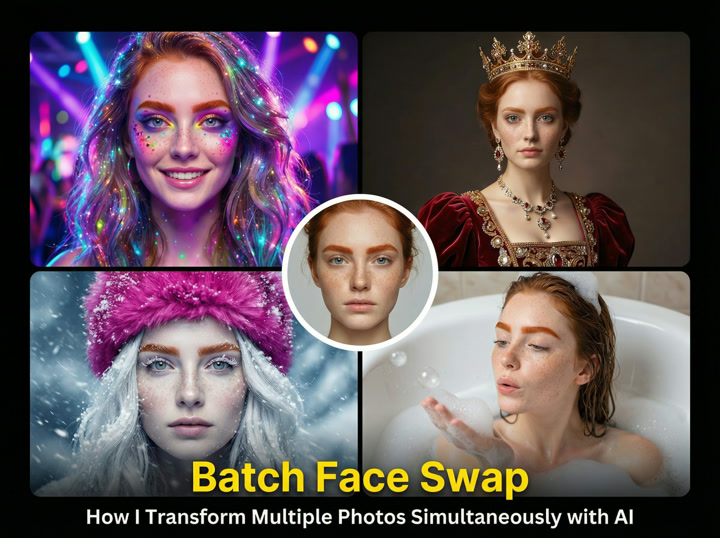
Looking to transform dozens or even hundreds of images with face swaps but dreading the tedious hours of manual editing? That's exactly where batch face swap technology comes in. This AI-powered technique lets you replace faces across multiple images simultaneously, cutting what would be hours of work into just minutes. Instead of processing each photo individually, batch face swap applies the same transformation to entire collections with a single click.
What is Batch Face Swap and How Does It Work?
Batch face swap is an advanced AI application that allows you to replace faces across multiple images in one operation. Unlike traditional face swap methods that process images one at a time, batch processing handles entire collections simultaneously, dramatically increasing efficiency while maintaining quality and consistency.
The technology relies on sophisticated facial recognition systems to identify and map facial features across images. When you input a source face and target images, the AI first detects all faces using neural networks trained on millions of facial images. These systems can recognize faces from various angles, lighting conditions, and even with partial obstructions.
Once faces are detected, deep learning algorithms create detailed maps of facial landmarks – typically 68 key points that mark eyes, nose, lips, and jawline. The AI then aligns the source face to match the position, angle, and expression of each target face. Finally, algorithms blend the swapped face naturally into each image, adjusting for lighting, skin tone, and surrounding context.
The real magic happens in the deep learning models powering these systems. Rather than following explicit programming instructions, these algorithms have learned facial patterns through exposure to vast datasets, allowing them to handle the complex variables involved in realistic face integration.
The Evolution from Single to Batch Face Swapping
Face swapping has come a long way from its origins in traditional image editing software. Early face swaps required painstaking manual work in Photoshop – selecting faces, adjusting layers, matching colors, and blending edges by hand. Each image took 15-30 minutes of focused work by someone with significant technical skill.
The introduction of deep learning algorithms around 2017 brought the first automated face swaps, but these still processed images individually. The breakthrough came when batch processing capabilities were integrated with these AI systems, enabling simultaneous transformation of multiple images.
- Time required: Single swaps (15-30 minutes per image) vs. Batch (seconds per image)
- Manual effort: Single swaps (high expertise needed) vs. Batch (minimal technical skill)
- Consistency: Single swaps (variable results) vs. Batch (uniform quality across images)
- Scalability: Single swaps (impractical beyond a few images) vs. Batch (handles hundreds effortlessly)
This evolution represents a fundamental shift from face swapping as a technical skill to an accessible tool that anyone can use regardless of their image editing expertise.
Key Benefits of Using Batch Face Swap
Batch face swap technology delivers several significant advantages over traditional image-by-image processing methods. The most obvious is the dramatic workflow improvement – tasks that once required days can be completed in minutes. This efficiency transforms what's possible for content creators, marketers, and individuals alike.
Beyond pure time savings, batch processing provides consistency advantages that manual methods simply can't match. When algorithms apply the same transformation logic across multiple images, you get predictable, uniform results without the quality variations that naturally occur in manual editing.
The batch approach also opens up entirely new creative possibilities. Projects involving dozens or hundreds of images – like turning an entire photo album into a themed collection or testing multiple marketing concepts – become realistic options rather than theoretical exercises.
Time Efficiency and Productivity Gains
The time savings from batch face swap technology are nothing short of remarkable. Consider this real-world comparison: manually face-swapping 100 images using traditional methods would take 25-50 hours of focused work. Using batch processing, the same project takes just 10-15 minutes – a 99% reduction in time investment.
This efficiency translates directly into productivity benefits across various workflows:
- Set up large batches before lunch or meetings, return to completed results
- Process overnight batches for deadline-driven projects
- Test multiple creative concepts in the time previously needed for just one
- Focus creative energy on concept and quality rather than repetitive technical tasks
- Scale projects without proportionally increasing time commitments
These productivity gains are particularly valuable for professionals with tight deadlines or businesses needing to quickly iterate through multiple creative options before finalizing campaigns.
Quality and Consistency Across Multiple Images
One of the most significant advantages of batch face swap technology is the consistency it delivers across images. Advanced algorithms ensure that facial expressions, skin tones, lighting, and blending maintain uniform quality regardless of how many photos are processed.
In manual face swapping, quality typically varies between images – even when done by the same person. Early images might receive more attention to detail, with later ones suffering from editor fatigue. Batch processing eliminates this problem entirely, applying the same precision to the hundredth image as it does to the first.
Modern AI face swap tools have become remarkably good at preserving natural lighting conditions and skin textures. The algorithms analyze the original lighting patterns in each image and apply appropriate shadows, highlights, and color grading to the swapped face, making the results look convincingly authentic across an entire collection.
This consistency is particularly valuable for professional applications like marketing campaigns, where a cohesive visual identity across multiple assets is essential for brand integrity.
Multi-Face Detection Capabilities Within a Single Image
Today's facial recognition systems can identify and process multiple faces within a single image, adding another powerful dimension to batch face swapping. This capability is particularly valuable when working with group photos, where you might want to replace several or all faces simultaneously.
The technology relies on sophisticated facial recognition algorithms that scan images for facial patterns, identifying each distinct face regardless of position, angle, or partial obstruction. Once detected, each face is individually mapped with precision landmarks that guide the swap process.
What's impressive is how these systems maintain consistent quality across all faces in the image while accounting for the unique characteristics of each – different angles, expressions, lighting conditions, and distances from the camera. The algorithms adjust the source face accordingly for each target, ensuring natural-looking results throughout the image.
This multi-face capability dramatically expands creative possibilities, allowing for scenarios like placing the same person in multiple positions within a single photo, or transforming an entire group to share facial characteristics while maintaining individual expressions.
How to Use Batch Face Swap: A Step-by-Step Guide
While specific interfaces vary between tools, the fundamental process of batch face swapping follows a consistent workflow. Understanding these core steps will help you achieve quality results regardless of which AI face swap tool you choose.
The basic process involves preparing your images, uploading them to your chosen tool, selecting face swap parameters, and processing the batch. However, the details matter significantly – proper preparation and settings adjustment make the difference between amateur-looking results and professional-quality transformations.
Successful batch face swapping requires attention to image selection, understanding technical requirements, and following best practices that I've learned through extensive experimentation across different projects and tools.
- Prepare source and target images
- Select and configure your preferred AI face swap tool
- Upload source face(s) and target images
- Adjust face detection and processing settings
- Process the batch
- Review and refine results as needed
- Download and organize the completed images
Let's explore each step in detail to ensure you get optimal results from your batch face swap projects.
Preparing Your Images for Optimal Results
The quality of your input images directly determines the quality of your face swap results. Taking time to prepare properly will save you frustration and disappointment later.
For source faces (the faces you want to apply to other images), choose high-resolution photos with clear, well-lit facial features. Frontal angles work best, though slight turns can still yield good results. Avoid extreme expressions unless specifically desired in your output. I've found that neutral or slightly smiling expressions typically provide the most versatile source material for batch processing.
For target images (where faces will be replaced), consistency in resolution, lighting conditions, and angle helps facial recognition systems produce more uniform results. If possible, organize your target images into batches with similar characteristics – process outdoor photos separately from indoor ones, for instance.
- Use high-resolution images (minimum 1080p) for both source and target
- Ensure faces are clearly visible and well-lit
- Choose source faces with neutral expressions for most versatility
- Group similar target images for more consistent batch results
- Remove heavily filtered or heavily compressed images
- Avoid extreme angles or faces with substantial occlusion
- Include some neck/shoulders in source images for natural blending
Remember that facial recognition systems need sufficient facial data to work with – extremely small faces in group shots may not be detected reliably, or may produce lower-quality results than more prominent faces.
Step-by-Step Process
Once your images are prepared, the actual batch face swap process follows these steps in most AI face swap tools:
1. Upload your source face(s): Select the face you want to apply across your images. Some tools allow multiple source faces for different swap combinations.
2. Upload target images: Add all the photos where you want to replace faces. Most tools support uploading entire folders or multiple selections.
3. Configure detection settings: Depending on the tool, you may need to adjust face detection sensitivity, minimum face size, or detection confidence threshold. Start with defaults, then refine if needed.
4. Set processing options: Choose whether to process all detected faces or select specific ones. Some tools allow you to exclude certain faces from batch processing.
5. Adjust quality settings: Higher quality typically means longer processing time. For initial tests, medium settings often suffice.
6. Start processing: Initiate the batch job and wait for completion. Processing time varies based on image count, resolution, and your hardware.
7. Review and download: Examine the results, adjust settings if needed for problematic images, and download your completed batch.
The workflow is designed to be straightforward, though advanced tools offer additional options for fine-tuning results.
Support for Multiple File Formats
Most AI face swap tools support common image formats, though compatibility and quality retention vary across platforms. Understanding format strengths and limitations helps optimize your workflow.
| Format | Pros | Cons | Best For |
|---|---|---|---|
| JPG/JPEG | Small file size, widely supported | Lossy compression affects quality | Web sharing, general use |
| PNG | Lossless quality, transparency support | Larger file sizes | Professional editing, transparency needs |
| WEBP | Efficient compression, good quality | Not universally supported | Web optimization, social media |
| TIFF | Highest quality, professional standard | Very large files, slower processing | Print projects, archival purposes |
From experience, PNG format delivers the best balance of quality and compatibility for face swap processing. When working with transparency requirements (like swapping faces onto characters with transparent backgrounds), PNG becomes essential. For web-destined content, processing in PNG then converting to optimized WEBP often yields the best results.
Some advanced AI face swap tools also support video formats like MP4 and MOV, enabling face replacement across video frames. However, video processing is significantly more resource-intensive and may require specialized tools beyond standard batch processors.
Technical Requirements for Running Batch Face Swap Tools
The computational demands of batch face swap processing vary widely between tools, particularly between cloud-based and local options. Understanding the technical requirements will help you choose the right approach for your hardware configuration.
- Minimum requirements: Modern quad-core CPU, 8GB RAM, integrated graphics, 100GB free storage
- Recommended setup: 8-core CPU, 16GB+ RAM, dedicated GPU with 6GB+ VRAM, 250GB+ SSD storage
- Professional setup: 12+ core CPU, 32GB+ RAM, RTX 3070/3080/4070/4080 or better GPU, 500GB+ SSD
GPU acceleration dramatically improves performance for local processing tools. The deep learning operations underlying face swap technology benefit enormously from GPU parallel processing capabilities. In testing, an RTX 3080 processed batches approximately 8-10 times faster than CPU-only processing on the same system.
For those without powerful GPUs, cloud-based tools offer an accessible alternative, as they run on remote servers with dedicated hardware. However, they typically involve subscription costs and potential privacy considerations that local processing avoids.
Internet bandwidth becomes relevant for cloud tools – uploading large batches requires decent connection speeds, especially when working with high-resolution images.
Top Applications and Use Cases for Batch Face Swap
Batch face swap technology opens up a remarkable range of applications spanning professional, creative, and personal use. The ability to transform multiple images simultaneously creates opportunities that simply weren't feasible when face swapping required image-by-image processing.
The technology's versatility makes it valuable across numerous industries and workflows. Content creators leverage batch processing to quickly generate variations on marketing materials. Photographers use it to offer unique services to clients. Individuals apply it to personalize collections or create themed photo series for special occasions.
What makes batch face swap particularly powerful is how it democratizes what was once complex image manipulation, making it accessible to users without advanced technical skills. This accessibility has sparked creative applications that extend well beyond the technology's original purpose.
Professional Use Cases for Marketing and Content Creation
Batch face swap has become a valuable tool for marketing professionals and content creators who need to produce and test multiple visual concepts efficiently. The technology enables rapid iteration and personalization at a scale previously impossible.
Marketing teams use batch processing to test different "faces" of campaigns before committing to expensive photo shoots. Content creators leverage the technology to personalize stock imagery for specific markets. Video production companies can even use advanced versions to transform background actors across multiple scenes for consistency.
The workflow improvements are particularly valuable in deadline-driven environments. Tasks that once required days of specialized editing can now be completed in minutes, allowing more time for creative concept development and refinement.
| Application | Benefits | Key Features Needed |
|---|---|---|
| Marketing Mockups | Rapid testing of different models/spokespeople | Consistent quality, multi-face support |
| Localized Content | Market-specific imagery without multiple shoots | Natural blending, ethnicity adaptation |
| Stock Photo Personalization | Custom imagery without custom photography | High resolution output, commercial licensing |
| Consistent Team Photos | Unified company imagery with remote teams | Multi-face detection, lighting matching |
Face Swap for Marketing Mockups and Testing
Marketing teams have embraced batch face swap as a powerful tool for concept testing and mockup creation. Before investing in expensive photo shoots or committing to a specific campaign direction, marketers can quickly visualize multiple options using different faces.
For example, a clothing brand recently used batch face swap to test five different models across their entire summer collection. Instead of scheduling five separate photo shoots, they conducted one shoot, then used AI to create variations with different faces. This allowed them to test market response to different models before finalizing their campaign – saving thousands in production costs while gathering valuable consumer data.
The technology also enables rapid adaptation for different demographic targets. A single set of product photos can be transformed to feature faces that resonate with specific market segments, creating customized marketing materials without additional photography costs.
The key benefit is risk reduction – marketing teams can visualize and test concepts before making major production investments, significantly improving campaign ROI.
Face Swap for Professional Headshots and Profile Pictures
Corporate teams are increasingly turning to batch face swap technology to create consistent, professional-looking headshots across distributed workforces. Rather than requiring each employee to arrange professional photography (with inevitable quality and style variations), companies can now standardize their visual presentation.
The process typically involves creating a small set of template images with professional lighting, composition, and background. Employees then provide simple selfies or existing photos, which are swapped onto the template images using batch processing. The result is a unified professional appearance across all team members, regardless of their location or access to professional photographers.
This approach is particularly valuable for remote teams spanning multiple countries. One technology company I worked with used this method to create consistent LinkedIn and website profiles for their 200+ employees across 12 countries, completing the entire project in just three days.
Beyond corporate applications, individuals use similar techniques to create professional-looking headshots for job applications, social media profiles, and personal branding without hiring a photographer.
Creative and Entertainment Applications
Beyond professional use, batch face swap has spawned a thriving ecosystem of creative and entertainment applications. The technology enables playful, artistic, and sometimes viral content that captures attention and sparks engagement.
Themed family photos have become a popular use case – swapping family members' faces onto characters from favorite movies, historical figures, or artwork. Wedding photographers offer unique guest books where the couple's faces appear in famous romantic scenes throughout history. Parents create personalized children's books featuring their child as the main character across every page.
Social media content creators leverage batch processing to generate entire narrative series. One viral example featured a creator who swapped their face onto different historical figures through the ages, creating a humorous "immortality evidence" timeline that garnered millions of views.
- Create personalized "starring you" movie posters across an entire film franchise
- Generate historical reimaginings with family members as famous figures
- Produce themed holiday cards with family faces on classic movie scenes
- Design personalized children's books with the child as the protagonist
- Develop humorous "evidence" of time travel or historical presence
- Create alternate reality scenarios like "what if I was in this band"
- Produce personalized calendars featuring friends in different scenarios
These applications demonstrate how batch face swap has democratized a form of creative expression previously limited to those with advanced image editing skills.
Privacy, Ethics, and Legal Considerations
While batch face swap technology offers tremendous creative possibilities, it also raises important privacy, ethical, and legal considerations that must be addressed. Understanding these concerns is essential for responsible use.
Privacy concerns center around how face data is processed, stored, and potentially accessed by others. When using cloud-based tools, user faces and images are typically uploaded to remote servers, creating potential data security risks. Local processing tools generally offer better privacy protection since data remains on your device, though they may still collect usage statistics.
From an ethical standpoint, face swapping without consent raises significant concerns. The technology can potentially be misused to place people in compromising, embarrassing, or misleading contexts. This connects to broader concerns about deepfake technology, which shares technical foundations with face swapping but is often used with malicious intent to spread misinformation or create fake videos.
Legally, using someone's likeness without permission may violate right of publicity laws in many jurisdictions. Commercial use of face-swapped images generally requires explicit consent from the person whose face is used.
- Always obtain consent before using someone's face in swap projects
- Consider privacy implications of cloud versus local processing
- Never create misleading or potentially harmful content
- Be transparent about edited images in public contexts
- Research specific legal requirements for commercial applications
- Check terms of service for stock images if incorporating them
- Keep records of permissions obtained for business projects
Privacy and Data Security Concerns
The privacy implications of face swap technology vary significantly based on the processing method and tool selection. Understanding these differences helps you make informed decisions about protecting sensitive data.
Cloud-based face swap tools process your images on remote servers, requiring you to upload both source faces and target images. This creates several privacy considerations: How securely is your data transmitted? How long are your images stored? Who has access to them? Different services have varying privacy policies – some delete images immediately after processing, while others may retain them for extended periods.
Local processing tools run entirely on your device, keeping face data under your control. This approach generally offers stronger privacy protection, though some applications may still collect anonymous usage data or require online activation.
| Tool Type | Privacy Level | Data Storage | Best For |
|---|---|---|---|
| Cloud-based (general) | Low-Medium | Remote servers | Non-sensitive personal projects |
| Cloud-based (privacy-focused) | Medium | Temporary remote storage | General use with basic privacy needs |
| Local processing (internet-connected) | Medium-High | Your device only | Professional work, sensitive content |
| Local processing (offline) | Highest | Your device only, no connectivity | Maximum security requirements |
For client work or sensitive projects, I strongly recommend using locally processed solutions that keep data entirely under your control. The privacy benefits often outweigh the convenience advantages of cloud solutions in professional contexts.
My Personal Experience: Results, Challenges, and Tips
After working with batch face swap technology across dozens of projects, I've developed insights into what works, what doesn't, and how to overcome common challenges. My experience spans marketing campaigns, creative personal projects, and professional content creation.
My most successful project involved creating a birthday gift for my father – swapping his face onto 50 iconic movie scenes from his favorite films. The batch process took about 20 minutes total, compared to what would have been days of manual work. The results were remarkably convincing, though action scenes with extreme movements required some manual touchups afterward.
Not all attempts have been equally successful. When I tried processing 200 family photos spanning decades, the quality varied significantly. Images from the 1980s with lower resolution and different film grain patterns produced noticeably artificial results. Modern digital photos worked beautifully, while older analog photos required more preparation and post-processing adjustments.
The most important lesson I've learned is that preparation matters enormously. Spending time sorting images by similarity (lighting conditions, face angles, image quality) and then processing similar batches together produces far better results than processing everything at once.
For professional projects, I now follow a two-stage workflow: a quick test batch with a small sample of images to identify potential issues, followed by the full batch with optimized settings. This approach catches problems early and saves significant time compared to reprocessing entire collections.
Comparing Popular Batch Face Swap Tools
After testing numerous AI face swap tools over the past two years, I've found significant differences in capabilities, user experience, and output quality. The right choice depends heavily on your specific needs, technical requirements, and privacy considerations.
The market divides roughly into cloud-based services and local processing applications. Cloud services offer convenience and accessibility without hardware requirements, while local tools provide better privacy and, often, more control over the process.
Quality varies substantially between tools. Some focus on speed and simplicity, processing large batches quickly but with occasional artifacts. Others prioritize photorealistic results but take longer and may require more powerful hardware. The most advanced tools offer fine-grained control over face detection, blending parameters, and post-processing adjustments.
Privacy features also differ significantly. Some tools process everything locally, never uploading your images. Others use cloud processing but implement encryption and rapid data deletion. A few offer hybrid approaches that leverage cloud resources while maintaining privacy.
| Tool Type | Speed | Quality | Ease of Use | Privacy | Price Range |
|---|---|---|---|---|---|
| Premium Cloud Services | Fast | High | Very Easy | Medium | $15-40/month |
| Free Cloud Services | Medium | Medium | Easy | Low | Free (often with watermarks) |
| Professional Desktop Apps | Variable (hardware dependent) | Highest | Moderate | High | $50-200 one-time |
| Open Source Solutions | Slow-Medium | Variable | Complex | Highest | Free |
In my experience, professional desktop applications offer the best balance of quality, control, and privacy for serious projects, while premium cloud services provide the most convenient option for occasional users without specialized hardware.
Online vs. Local Processing Options
The choice between online cloud-based tools and local processing applications represents one of the most significant decisions when selecting batch face swap software. Each approach offers distinct advantages and limitations.
Cloud-based tools operate through web browsers or mobile apps, processing your images on remote servers. The primary advantage is accessibility – you can use them from any device without worrying about hardware specifications. They also tend to offer simpler interfaces and faster processing since they leverage powerful server infrastructure. However, they require uploading your images to third-party servers, raising privacy concerns.
Local processing tools run entirely on your computer, keeping all images and face data on your device. This provides superior privacy protection and eliminates internet bandwidth limitations when processing large batches. Many local applications also offer more advanced customization options. The downside is their dependence on your hardware – without a capable GPU, processing can be significantly slower than cloud alternatives.
| Feature | Cloud Processing | Local Processing |
|---|---|---|
| Privacy | Images uploaded to servers | All data stays on your device |
| Hardware Requirements | Minimal (any modern device) | Significant (GPU recommended) |
| Processing Speed | Consistent regardless of your hardware | Depends on your system specifications |
| Batch Size Limitations | Often limited by subscription tier | Limited only by your storage and memory |
| Internet Dependency | Requires stable connection | Can work completely offline |
I typically recommend cloud-based solutions for casual users and those without dedicated graphics cards. For professionals handling sensitive client material or those processing very large batches, local processing tools generally prove more suitable despite the higher hardware requirements.
Future of Batch Face Swap Technology
Batch face swap technology stands at an exciting crossroads, with rapid advancement driven by broader progress in deep learning and AI. Several emerging trends point to where this technology is heading in the coming years.
The most significant developments center around quality improvements. Current deep learning algorithms still struggle with extreme angles, unusual lighting conditions, and faces partially obscured by objects or shadows. Next-generation models are already showing dramatic improvements in handling these edge cases, using more sophisticated neural network architectures that better understand three-dimensional facial structure.
Processing speed continues to improve through algorithm optimization and hardware acceleration. What takes minutes today will likely take seconds in the near future, enabling real-time batch processing for even large collections.
Privacy-preserving computation represents another frontier. New approaches using federated learning and on-device processing aim to provide advanced capabilities without requiring users to upload sensitive face data to remote servers.
- Enhanced realism with better handling of lighting, skin texture, and expressions
- Real-time processing capabilities for immediate feedback
- Integration with video editing platforms for motion content
- Mobile-optimized algorithms for on-device processing
- Voice and expression matching to create more coherent transformations
- Improved age and ethnicity adaptation for more versatile swaps
- Privacy-preserving computation models that protect facial data
Perhaps most intriguing is the convergence with other generative AI technologies, creating hybrid systems that not only swap faces but can modify expressions, aging, lighting conditions, and even generate entirely new variations based on the original faces.
Gender Swap Functionality
One of the most fascinating recent developments in batch face swap technology is advanced gender transformation functionality. This capability goes beyond simple face replacement to intelligently modify facial structure, features, and characteristics to create convincing cross-gender transformations.
Unlike basic face swapping, gender transformation requires sophisticated understanding of sexual dimorphism in facial structure. Advanced facial recognition systems identify gender-specific characteristics like jaw width, brow ridge prominence, cheekbone height, and lip fullness. Then specialized algorithms modify these features while preserving the identity essence of the original face.
The most advanced tools achieve this through dedicated neural networks trained specifically on gender-paired datasets. Rather than simply overlaying female features onto male faces (or vice versa), they generate new facial geometries that represent how that specific person might look as a different gender.
Creative applications of this technology have exploded in recent months. Photographers use it to create conceptual "parallel universe" portrait series showing subjects as their opposite-gender selves. Actors use it to visualize potential roles requiring gender transformation. Writers use it to visualize characters from different perspectives.
The technology works remarkably well in batch processing scenarios, applying consistent gender transformation parameters across entire photo collections while preserving individual identity and expression.
Conclusion: Is Batch Face Swap Right for You?
After exploring the capabilities, applications, and considerations of batch face swap technology, the question remains: is it the right solution for your needs?
For content creators, marketers, and visual professionals handling multiple images, the productivity benefits are undeniable. The ability to process dozens or hundreds of images simultaneously transforms workflows that once took days into tasks that take minutes. If time efficiency matters in your work, batch processing offers tremendous value.
For personal creative projects, the technology opens doors that were previously closed to those without advanced image editing skills. Family photo collections, themed social media content, and personalized gifts become accessible to anyone with basic computer skills.
The decision ultimately depends on your specific needs, technical resources, and comfort with the privacy considerations involved. Cloud-based tools offer accessibility and convenience, while local processing provides better privacy protection for sensitive content.
As you consider implementing batch face swap in your projects, focus on selecting tools that match your technical capabilities, privacy requirements, and quality expectations. Start with small test batches before committing to large projects, and remember that proper image preparation dramatically improves results.
Whether you're a professional seeking efficiency or a creative enthusiast exploring new possibilities, batch face swap technology offers exciting opportunities to transform how you work with and experience visual content. Try our AI face swap tool to start batch processing your photos today.