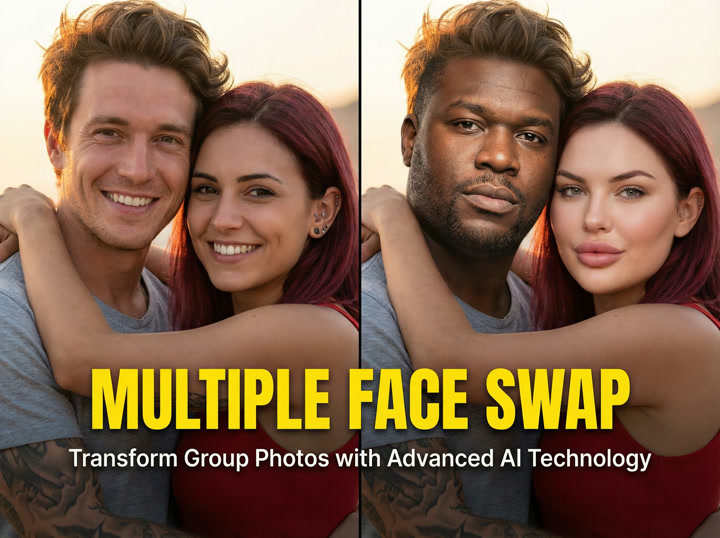
Understanding Multiple Face Swap Technology
Multiple face swap technology represents a significant advancement in photo manipulation, allowing users to simultaneously replace several faces in a single image. Unlike basic single-face replacements, multiple face swap uses complex facial recognition systems to identify, map, and transform numerous faces at once.
At its core, this technology relies on artificial intelligence to analyze facial features and structures. The system first detects all faces in an image, mapping key points like eyes, nose, mouth, and jawline. These facial landmarks become reference points for the AI, which then matches and replaces each face with corresponding points from source images.
Neural networks power the most effective multiple face swap tools, learning from thousands of examples to understand how faces should look from different angles and in various lighting conditions. This machine learning process enables the AI to make intelligent decisions about how to blend new faces naturally into the original image.
What sets multiple face swap apart is its ability to handle the complexities of group photos. The technology must account for different face angles, lighting variations, and multiple skin tones simultaneously – challenges that basic image editing tools can't effectively address.
How AI Detects and Replaces Multiple Faces
The process of multiple face swapping involves several sophisticated steps powered by facial recognition systems and computer vision technology. When you upload a group photo, the AI first scans the entire image to locate all faces present.
For each detected face, the system identifies up to 68 facial landmarks – specific points that define facial features and structure. These landmarks create a detailed facial map that the AI uses to understand the unique characteristics of each face, including proportions, angles, and expressions.
Neural networks then analyze these facial landmarks to determine how each new face should be positioned and transformed to match the original. This process includes:
- Facial detection identifies all people in the image
- Landmark mapping creates reference points on each face
- AI algorithms analyze facial characteristics
- New faces are adjusted to match original positioning
- Results are blended for natural transitions
What makes modern multiple face swap technology impressive is how algorithms handle challenging scenarios like partially obscured faces, different lighting conditions, and varying face angles. These algorithms continuously improve through machine learning, with each processed image helping the system become more accurate.
The Evolution of Face Swap Technology
Face swap technology has come a long way from its primitive beginnings. Early photograph manipulation required painstaking manual work by skilled editors, often resulting in obvious and unnatural-looking composites. These techniques typically focused on cutting and pasting facial elements between photos with basic blending.
The mid-2000s saw the first generation of digital face swap tools, which provided template-based replacements but lacked the ability to adapt to different facial angles and expressions. These tools required extensive manual adjustments to achieve even moderately realistic results.
The real breakthrough came with the integration of artificial intelligence and machine learning. Around 2015-2017, neural networks revolutionized the field by introducing automated facial analysis and transformation. This shift marked the beginning of truly convincing face swaps that could adjust to various face positions and lighting conditions.
Today's multiple face swap technology builds on these advances with sophisticated deep learning models that can process group photos with remarkable speed and accuracy. Modern computer vision systems can now identify and replace numerous faces simultaneously while maintaining natural skin tones and lighting consistency across the image.
This evolution has transformed face swapping from a niche technical skill to an accessible tool that anyone can use, dramatically reducing the time and expertise required to create convincing composite images.
Top Free Multiple Face Swap Tools Worth Trying
Finding quality face swap tools that can handle multiple faces without breaking the bank can be challenging. Fortunately, several free options deliver impressive results without watermarks or excessive restrictions. Here's a breakdown of the most capable free multiple face swap tools currently available.
| Tool Name | Max Faces Supported | Supported Formats | Quality Rating | Privacy Rating | Unique Features |
|---|---|---|---|---|---|
| Cleep AI | 10+ | Photo, Video, GIF | ★★★★★ | ★★★★☆ | Real-time processing, gender detection |
| FaceSwapper Online | 6 | Photo only | ★★★★☆ | ★★★☆☆ | No login required, instant download |
| Reface App | 4 | Photo, Short video | ★★★☆☆ | ★★★★☆ | Mobile-friendly, social sharing |
| FaceMix | 8 | Photo, GIF | ★★★★☆ | ★★☆☆☆ | Batch processing, expression matching |
| SwapFaces | 5 | Photo only | ★★★☆☆ | ★★★★★ | Local processing option, no data storage |
Most of these tools use artificial intelligence to analyze and process images, though they vary in their specific approaches and capabilities. The best choice depends on your particular needs – whether you're working with photos or videos, how many faces you need to swap, and how much control you want over the final result.
Software quality can vary significantly between free face swap tools. Some offer surprisingly sophisticated image editing features that rival paid options, while others provide basic functionality that works well for simple swaps but struggles with complex scenarios.
Comparing Features and Limitations
When evaluating multiple face swap tools, understanding their specific strengths and limitations helps you choose the right one for your needs. Free tools often have meaningful differences in their core capabilities and restrictions.
Look for these essential features when choosing a multiple face swap tool:
- Automatic face detection that works accurately with multiple people
- Support for at least 4 faces simultaneously
- Natural skin tone matching between faces
- No watermarks on free versions
- Clear privacy policies about your images
The primary limitation of free face swap software is often processing power. Many tools restrict image resolution or apply subtle quality reductions to free users. Some also limit the number of swaps you can perform daily or weekly.
Another common constraint is facial recognition accuracy. While premium tools can handle extreme angles and partially obscured faces, free options typically require clear, front-facing images for best results. This becomes especially important when working with group photos where people may be positioned at different angles.
Artificial intelligence quality varies dramatically between tools. The most advanced face swap systems use specialized neural networks trained specifically for facial analysis, resulting in much more natural blending and expression matching. Less sophisticated tools may produce uncanny valley effects where something looks "off" about the swapped faces.
When free tools lack certain features, consider workarounds like doing preliminary image edits to improve lighting consistency before uploading, or using multiple tools in sequence to achieve your desired result.
Web-Based vs. App-Based Solutions
The choice between web applications and mobile apps for face swapping depends largely on your workflow preferences and technical requirements. Each approach offers distinct advantages and limitations.
Web-based face swap tools typically provide greater processing power since they leverage server-side computing rather than your device's capabilities. This means they can handle more faces simultaneously and often deliver higher-quality results. They're also accessible from any device with a browser, making them versatile options for both casual and professional use.
Mobile apps offer convenience and portability, allowing you to create face swaps anywhere. Many mobile solutions also integrate directly with your phone's camera and gallery, streamlining the photo selection process. However, they generally support fewer faces simultaneously due to mobile processing limitations.
Privacy considerations also differ between platforms. Web applications typically require uploading your images to external servers for processing, raising potential privacy concerns. Some tools store these images temporarily, while others may retain them longer. Mobile apps often process images locally on your device, potentially offering better privacy protection.
For quick, on-the-go face swaps with one or two faces, mobile apps typically offer the most convenient experience. For complex projects involving multiple faces or requiring higher quality output, web-based software generally provides superior results and more granular control options.
Step-by-Step Guide to Perfect Multiple Face Swaps
Creating successful multiple face swaps requires careful planning and attention to detail. Follow this comprehensive workflow to achieve natural-looking results with any face swap tool:
- Choose your base group photo - Select a clear image where all faces are visible and well-lit. Group photos with similar lighting across all faces work best.
- Select individual face images - For each person, find a high-quality photo with a similar angle and expression to their position in the group photo.
- Prepare your images - Crop individual face images to focus on the face and eliminate unnecessary background elements.
- Upload to your chosen tool - Follow the specific upload process for your selected face swap software.
- Match faces accurately - Ensure each new face is correctly paired with the right person in the group photo.
- Adjust settings for optimal results - Fine-tune blending strength, color matching, and smoothness settings if available.
- Review and make corrections - Check for unnatural edges, color mismatches, or alignment issues.
- Download and share the final image - Save your completed face swap in the highest available resolution.
Remember that image quality significantly impacts your results. Photos taken with a good camera in well-lit environments produce much better face swaps than dark, blurry, or heavily compressed images. When possible, use images captured under similar lighting conditions to minimize the work required from the face swap algorithm.
Many face swap failures happen because of mismatched face angles. If someone is looking to the side in your group photo, try to find a source image where they're facing a similar direction. The same applies to expressions – matching a smile with a serious face often produces strange results.
For complex projects, consider doing iterative swaps rather than attempting to replace all faces at once. This gives you more control over each individual replacement and often results in more natural overall results.
Tips for Selecting the Best Source Images
The quality of your face swap depends largely on the images you select as source material. Following these guidelines will significantly improve your results:
- Choose front-facing photos with clear visibility of entire faces
- Match lighting conditions between source and target images whenever possible
- Use high-resolution images for better detail preservation
- Select similar facial expressions for more natural results
- Avoid images with objects obscuring parts of the face (glasses, hands, hair)
Face angle is crucial when selecting source images. If the person in your group photo is looking slightly to the right, find a source image with the same orientation. Even small angle mismatches can create unnatural-looking results.
Lighting consistency dramatically affects realism. Photos taken in similar lighting environments (both indoors, both in daylight, etc.) blend more seamlessly than mixing drastically different lighting conditions. Pay particular attention to the direction of light, as shadows falling across faces in different directions are difficult for AI to reconcile.
Resolution matters more than you might expect. Higher-resolution source images give the face swap algorithm more detail to work with, resulting in clearer, more natural-looking swaps. When possible, use photos captured with good cameras rather than heavily compressed social media images.
For group photos, try to use images taken around the same time period. This reduces differences in appearance due to aging, weight changes, or hairstyle variations that might make the swap look unnatural.
Adjusting Settings for Natural-Looking Results
Most advanced face swap tools offer adjustment options that help you fine-tune results. Understanding these settings can transform an obvious face swap into a convincingly natural image.
Blending strength controls how aggressively the new face is merged with the original image. Higher settings create more complete replacements but may look artificial, while lower settings maintain more of the original facial structure for a subtle effect. For group photos with varying lighting conditions, adjusting the blending individually for each face often produces better results than using the same setting for everyone.
Color matching is crucial for realistic face swaps, especially when source images have different lighting temperatures. Look for settings that let you adjust color balance, saturation, and brightness to match the surrounding faces in your group photo. Small tweaks to skin tone can make the difference between an obvious swap and a seamless integration.
Facial feature alignment requires careful attention, particularly with faces at angles. If your tool allows manual adjustment of how facial landmarks align between the source and target images, take time to match key features like eyes, nose, and mouth positioning. This is especially important when swapping between genders or between people with significantly different facial structures.
When working with challenging scenarios like significant age differences or gender differences, consider using more conservative settings with partial transparency. This preserves some characteristics of the original face while incorporating elements of the new face, often creating more believable results than complete replacements.
Creative Applications Beyond Entertainment
While face swap technology is often associated with humorous social media posts, its applications extend far beyond simple entertainment. Professional photographers, marketers, and content creators increasingly use multiple face swap as a practical image editing tool for legitimate business and creative purposes.
Photographers use face swap technology to create perfect group portraits when capturing everyone at their best in a single shot proves impossible. Wedding photographers, for instance, can ensure every family member appears at their best in formal portraits by combining elements from multiple shots taken in quick succession.
In marketing and advertising, multiple face swap enables the creation of consistent brand imagery across campaigns. Companies can maintain a uniform appearance for models representing their products, even when shooting sessions occur at different times or locations.
Content creators leverage this photograph manipulation technique to produce themed content that would be impractical or impossible to stage. Historical recreations, fictional scene depictions, and creative storytelling all benefit from the ability to place modern subjects into carefully constructed contexts.
Education and training materials also benefit from face swap technology, allowing instructors to create personalized examples or demonstrate concepts using familiar faces to increase engagement and retention among students.
Fixing Group Photos Where Someone Blinked
One of the most practical applications of multiple face swap technology is salvaging otherwise perfect group photos ruined by someone blinking, looking away, or making an awkward expression. This common photography problem now has an elegant solution.
To fix a group photo with closed eyes or awkward expressions:
- Take multiple shots of the same group whenever possible
- Identify the best overall composition with good positioning
- Find individual good expressions from other shots in the series
- Use multiple face swap to combine the best elements
- Adjust and fine-tune for seamless integration
This approach works best when photos are taken in quick succession under identical lighting and camera settings. The photograph manipulation process becomes much simpler when working with consistent source material.
For family events and special occasions, this technique proves invaluable. Rather than settling for an imperfect memory where Uncle John is mid-blink or your child is looking away from the camera, you can create the perfect composite that captures everyone at their best moment.
Professional photographers often use this technique for client deliverables, especially for challenging shoots involving large groups or young children. The ability to combine elements from multiple shots significantly increases the likelihood of producing a perfect group portrait where everyone looks good simultaneously.
Creating Themed Group Portraits and Family Photos
Multiple face swap technology opens up creative possibilities for themed portraits that would be difficult or impossible to create through traditional photography alone. This image editing approach allows families and friend groups to create unique, personalized artwork.
Popular themed portrait concepts include:
- Family members as superheroes or movie characters
- Renaissance-style family portraits with period clothing and settings
- Holiday cards with fantastical or humorous scenarios
- Generational photos combining modern faces with historical family members
- Sports team portraits with consistent uniforms and backgrounds
Creating successful themed portraits requires careful photograph manipulation planning. Start by finding or creating appropriate background and body images that match your theme. Then capture close-up photos of each person's face with lighting that complements the final scene.
The most convincing themed portraits maintain consistency across all elements. Pay attention to lighting direction, color temperature, and image resolution to ensure the final composite looks cohesive rather than obviously edited.
This approach offers particular value for families with members who live far apart. Rather than requiring everyone to gather for a specialized photo shoot, individual photos can be combined into a themed portrait that brings everyone together virtually, creating a meaningful keepsake despite geographic separation.
Using Multiple Face Swap for Social Media Content
Content creators increasingly use multiple face swap technology to produce engaging social media material that stands out in crowded feeds. From viral transformation videos to interactive posts, face swap capabilities enable creative content formats that generate high engagement.
Effective social media content ideas using multiple face swap include:
- Transformation videos for TikTok and Instagram Reels
- Before/after reveals showing dramatic group changes
- "Guess who" interactive posts challenging followers
- Celebrity lookalike comparisons and mashups
- Historical figure reimaginings with modern contexts
For influencers and brands, selfie transformations using face swap technology create shareable content that encourages audience participation. Many successful campaigns invite followers to submit their own photos for inclusion in creative face swap series, generating community engagement while expanding reach.
When creating face swap content for social media, consider platform-specific characteristics. TikTok and Instagram Reels favor dynamic video transformations, while Pinterest and Twitter often see better engagement with striking before-and-after image comparisons.
Remember that social media platforms have different policies regarding manipulated images. Always disclose when you've used face swap technology, particularly for content that might be mistaken for unaltered photos. Transparent labeling builds trust with your audience while avoiding potential policy violations.
Common Challenges and How to Overcome Them
Despite advances in artificial intelligence and image editing technology, multiple face swap still presents several common challenges. Understanding these issues and knowing how to address them will help you achieve better results with any face swap tool.
The most frequent problems users encounter include:
- Unnatural skin tone matching between swapped faces
- Blurry or distorted facial features in the final image
- Lighting inconsistencies creating obvious boundaries
- Gender-based face swapping difficulties
- Processing errors when working with multiple faces
Skin tone matching issues typically stem from differences in lighting between source images. To address this, try selecting source photos with similar lighting conditions or use image editing tools to adjust skin tones before uploading to your face swap software. Some advanced tools include skin tone matching features that can be adjusted manually.
Blurry results usually indicate insufficient image quality in either the source or target photo. Always use the highest resolution images available, and avoid heavily compressed photos from social media platforms when possible.
Lighting inconsistencies create obvious swap boundaries when directional shadows don't align between faces. Look for source images with similar lighting direction to your group photo, or consider using face swap tools that offer lighting adjustment features.
When the artificial intelligence struggles with a particular swap, sometimes the simplest solution is trying a different tool. Various face swap algorithms have different strengths and weaknesses, so an image that fails with one system might work perfectly with another.
Ensuring Natural-Looking Results
Creating convincing multiple face swaps requires attention to details that might seem minor but significantly impact the final image's realism. Professional-quality results often come from refinement rather than relying solely on automatic processing.
After performing your initial face swap, examine these critical areas for natural integration:
- Check edge blending around hairlines and jawlines
- Verify consistent lighting across all swapped faces
- Compare skin tone matching between original and new faces
- Examine facial expression naturalness in context
- Look for consistent image quality across the entire photo
Edge blending issues are among the most common giveaways of face swapping. If you notice harsh lines or unnatural transitions, try adjusting blending strength settings or use Adobe Photoshop or similar image editing software to manually soften edges with a small feathered brush.
Lighting consistency dramatically affects how natural a face swap appears. Pay particular attention to highlight and shadow patterns – if the original photo shows light coming from the left but your swapped face appears lit from the right, viewers will immediately sense something is wrong, even if they can't identify exactly what.
Facial expression congruence matters in group contexts. If everyone in a photo is smiling but one swapped face has a serious expression, it creates a dissonance that makes the edit obvious. Always try to match expressions between source faces and the group context.
For professional-quality results, consider using multiple tools in sequence. Start with AI-powered face swap software, then refine details in dedicated image editing programs for complete control over the final output.
Dealing with Difficult Face Angles and Lighting
Face angles and lighting variations present significant challenges for even the most advanced face swap technology. When working with images that aren't ideal, specific strategies can help overcome these limitations.
For challenging face angles:
- Find source images with as similar an angle as possible to the target position
- For profile or three-quarter views, avoid using straight-on face images
- Consider taking new photos with your camera specifically matched to the required angle
- When swapping multiple faces, prioritize angle matching over identical expressions
Difficult lighting scenarios require careful source image selection:
- Match the direction of main light sources between photos
- For harsh shadows across faces, find source images with similar shadow patterns
- Avoid mixing indoor and outdoor lighting when possible
- For evening or colored lighting, find source images with similar color temperatures
Sometimes the best approach is adjusting your expectations based on available images. Current technology still struggles with extreme angles (faces looking directly up or down) and dramatic lighting (half the face in shadow). In these cases, consider whether a partial face swap might produce better results than attempting a complete replacement.
When all else fails, capturing new source images designed specifically for your face swap project often yields the best results. Position your camera to match the angle needed and recreate similar lighting conditions for optimal compatibility.
Addressing Gender and Age Swapping Challenges
Face swapping across gender and age boundaries presents unique technical challenges. Artificial intelligence systems are typically trained on datasets that reinforce certain facial structure expectations, making cross-demographic swaps more difficult.
When swapping between genders:
- Use higher blending settings to allow more complete facial structure replacement
- Pay special attention to jawline and brow ridge areas, which tend to have gender-specific characteristics
- Consider adjusting face shape settings if your tool offers this option
- Sometimes a partial swap focusing on central facial features produces more natural results
Age differences require similar considerations:
- Skin texture differences between young and older faces often create unnatural results
- When swapping children's faces onto adults, adjust skin smoothness settings
- For elderly faces on younger bodies, texture preservation helps maintain identity
- Consider whether maintaining some characteristics of the original age appearance creates more convincing results
The most sophisticated face swap tools now include specific settings for cross-demographic swaps. These specialized image editing options help the artificial intelligence better understand the facial transformation you're attempting, producing more natural results in challenging scenarios.
Remember that some combinations may simply exceed current technical capabilities. In these cases, adjusting your creative concept slightly often allows you to achieve similar effects while working within the technology's strengths.
Privacy and Ethical Considerations
As multiple face swap technology becomes increasingly accessible, understanding the privacy implications and ethical responsibilities that come with this powerful photograph manipulation tool is essential. Responsible use requires balancing creative freedom with respect for others.
Key ethical guidelines for face swap users:
- Only swap faces with permission from the people involved
- Avoid creating misleading or potentially harmful content
- Always check tool privacy policies before uploading personal photos
- Be transparent when sharing altered images
- Use tools that don't permanently store your photos
Consent should be your primary consideration before creating any face swap. While swapping your own face or faces of friends who've given permission is generally acceptable, using strangers' faces without consent raises significant ethical concerns. This becomes particularly important when creating content that might be shared publicly.
The potential for misuse through deceptive photograph manipulation has prompted growing concern about deepfakes and other AI-generated content. As a responsible user, avoid creating content that could reasonably mislead viewers about actual events or statements. This includes political content, false representations of real people in compromising situations, or anything that could damage someone's reputation.
Beyond ethical considerations, be aware that in many jurisdictions, certain types of non-consensual image manipulation may violate privacy laws, right of publicity statutes, or defamation laws. These legal frameworks continue to evolve as the technology becomes more widespread.
Understanding Privacy Policies of Face Swap Tools
Before uploading your photos to any face swap software or web application, carefully review their privacy policies to understand how your images will be handled. Different platforms have vastly different approaches to data usage, storage, and security.
Key privacy features to look for in face swap tools:
- Clear data retention policies stating how long images are kept
- Immediate deletion of photos after processing
- No training of AI models on user uploads without consent
- Encrypted uploads and downloads
- No account requirement for basic use
- Transparent disclosure about how data is used
Many free face swap tools generate revenue by using uploaded images to improve their artificial intelligence algorithms. While this practice itself isn't necessarily problematic, users should be clearly informed and given the choice to opt out.
Be particularly cautious with tools that require creating accounts or logging in through social media. These connections often grant the application broader access to your personal information beyond just the images you're uploading for face swapping.
Some software options now offer local processing that keeps your images on your device rather than uploading them to external servers. While these tools may have more limited capabilities due to processing power constraints, they provide significantly better privacy protection for sensitive images.
Creating Responsibly: Best Practices
Responsible use of multiple face swap technology balances creative expression with ethical considerations. Following these best practices helps ensure your use of this powerful photograph manipulation tool respects both subjects and viewers.
The Ethical Creator's Pledge:
- I will obtain permission before swapping someone else's face
- I will clearly disclose when I've altered images
- I won't create content that could reasonably deceive viewers
- I will consider the potential impact of my creations on the people depicted
- I will respect copyright and intellectual property in my source materials
- I won't use face swap technology to create harmful or demeaning content
Transparency is fundamental to ethical content creation. When sharing face-swapped images, clearly indicate they've been modified, especially if the changes might not be immediately obvious. This disclosure respects viewers' right to understand what they're seeing and maintains trust in your content.
Consider creating a personal ethical framework that guides your use of artificial intelligence tools like face swap technology. Ask yourself whether the content you're creating aligns with your values and whether you'd feel comfortable having similar content created with your likeness.
For content creators with audiences, use your platform to model responsible technology use. Demonstrate creative applications while explaining your process, including how you ensure consent and respect for subjects. This helps establish positive norms around emerging technologies with significant potential for both creative expression and misuse.
Future of Multiple Face Swap Technology
Multiple face swap technology continues to evolve rapidly, driven by advancements in artificial intelligence, neural networks, and machine learning. Current trends point toward several exciting developments that will expand capabilities while addressing existing limitations.
Predicted future developments include:
- Real-time multiple face swap in video calls and live streaming
- Improved handling of extreme angles and expressions
- Better preservation of unique facial characteristics
- Integration with AR/VR platforms for immersive experiences
- Enhanced privacy protections built directly into the technology
Neural network advancements will likely enable more sophisticated facial analysis, allowing for better handling of challenging scenarios like partial face visibility, unusual lighting, or extreme angles. These improvements will make face swaps more convincing across a wider range of input images.
Machine learning models are becoming increasingly efficient, reducing the computational resources required for high-quality face swaps. This efficiency will enable more powerful face swap capabilities on mobile devices and in real-time applications like video calls and live broadcasts.
Computer vision improvements will enhance face detection accuracy, especially for groups with partially obscured faces or unusual positioning. This will make multiple face swap more reliable for complex group photos where current technology sometimes struggles to identify all faces correctly.
As these technologies mature, expect to see greater accessibility through simplified interfaces that hide technical complexity while providing professional-quality results. The gap between basic free tools and sophisticated professional options will likely narrow as algorithms become more efficient and user-friendly.
Emerging Applications in Business and Education
While entertainment applications of multiple face swap technology receive the most attention, professional applications in business and education are expanding rapidly. Organizations are finding innovative ways to leverage this artificial intelligence technology for practical purposes.
In corporate training, face swap technology creates personalized learning materials that increase engagement. Rather than generic scenarios, employees see themselves and their colleagues in training simulations, making abstract concepts more relatable and memorable. This personalization has shown promising results for information retention and application.
Educational institutions use face swap to create immersive historical learning experiences, placing students into reconstructed historical scenarios or allowing them to "meet" historical figures. This approach makes history more tangible and engaging for young learners while reinforcing key concepts.
Marketing teams increasingly use face swap technology for product visualization and personalization. Allowing customers to see themselves using products before purchase improves conversion rates and reduces returns, particularly for apparel, accessories, and cosmetics.
These professional applications typically employ more sophisticated versions of face swap technology with additional safeguards and quality controls. As the technology matures, expect to see more specialized business solutions that address specific industry needs while maintaining appropriate privacy and security standards.
Conclusion: Mastering Multiple Face Swap
Multiple face swap technology represents a fascinating intersection of artificial intelligence, image editing, and creative expression. From fixing group photos where someone blinked to creating elaborate themed portraits, the applications extend far beyond novelty entertainment.
Success with face swapping comes from understanding both the capabilities and limitations of current technology. By selecting appropriate source images, adjusting settings thoughtfully, and applying refinement techniques, you can achieve remarkably natural results even with free tools.
As you explore this technology, remember that responsible use matters. Obtain permission before swapping someone else's face, be transparent about edited images, and consider the potential impact of your creations. These ethical practices help ensure face swap technology remains a positive creative tool rather than a source of harm.
The future of multiple face swap looks promising, with artificial intelligence advancements continually improving quality, accessibility, and capabilities. Whether you're using this technology for practical photo corrections, creative projects, or professional applications, staying informed about best practices will help you achieve the best possible results. Get started with Cleep AI face swap to transform your group photos today.
Quick Start: Essential Face Swap Tips
- Choose high-quality images with similar lighting and angles
- Start with simple swaps before attempting complex group photos
- Experiment with different tools to find which works best for your needs
- Pay attention to details like skin tone and edge blending
- Remember that ethical use preserves trust in your content